Category: Uncategorized

  • Tips for Building Your First WordPress Website

    Creating your first WordPress website can feel overwhelming at first, but with careful planning and the right tools, the process becomes much easier. WordPress is designed to be beginner-friendly, allowing users to build professional websites without extensive programming knowledge. These tips can help you create a website that is organized, attractive, and easy to maintain.

    Plan Your Website Before You Begin

    Before creating pages, think about the purpose of your website and the audience you want to reach. Planning your navigation and deciding what pages you need, such as Home, About, Contact, and Blog, will make it easier to organize your content and provide a better experience for visitors.

    Choose a Block Theme

    A Block Theme allows you to take advantage of Full Site Editing, making it easy to customize your website’s layout, colors, fonts, and templates. Choosing a simple, responsive theme gives your website a professional appearance while making future updates easier.

    Keep Your Design Simple

    A clean design helps visitors focus on your content. Use consistent colors, readable fonts, and enough spacing between sections. Avoid cluttering pages with too many images, animations, or unnecessary elements.
    Building your first WordPress website is a valuable learning experience. By planning ahead, using a Block Theme, organizing your content, and testing your website before publishing, you can create a professional, user-friendly website that is easy to maintain. As you gain experience, you can continue adding new features and improving your design.

    Home » Uncategorized
  • What Is Full Site Editing?

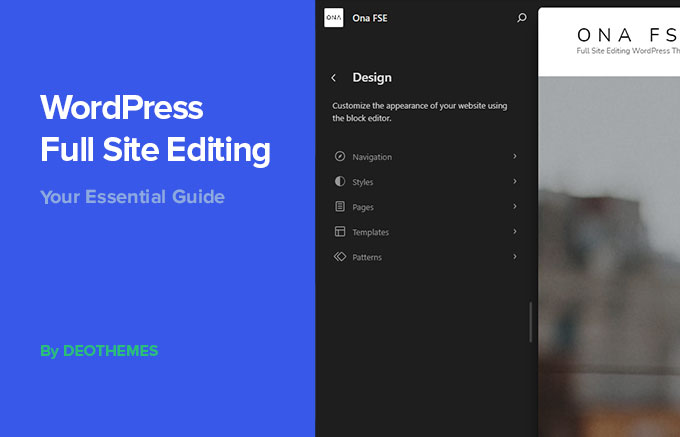
    Full Site Editing (FSE) is a modern WordPress feature that allows users to customize nearly every part of their website using blocks. Instead of editing theme files or using custom code, users can design headers, footers, templates, and page layouts through an easy-to-use visual editor. Full Site Editing makes website customization more accessible, especially for beginners.

    How Full Site Editing Works

    Full Site Editing is available with Block Themes. Using the Site Editor, you can modify the overall appearance of your website by arranging blocks, changing colors and typography, and editing templates. These changes affect the entire website, making it easy to maintain a consistent design.

    Key Features of Full Site Editing

    Full Site Editing includes several powerful tools that simplify website design:

    • Edit headers and footers without coding
    • Customize page and post templates
    • Use reusable block patterns to save time
    • Create navigation menus with the Navigation Block
    • Manage colors, fonts, and spacing through Global Styles

    These features allow users to build professional websites while maintaining a consistent look across every page.

    Benefits of Full Site Editing

    One of the biggest advantages of Full Site Editing is flexibility. Users can make design changes directly within WordPress without relying on third-party page builders or editing PHP files. This makes website maintenance easier and gives users greater control over their site’s appearance.

    Full Site Editing vs. the Classic Editor

    The Classic Editor focused mainly on editing page and post content, while most design changes required using the Customizer or editing theme files. Full Site Editing combines content editing and website design into one interface, making it faster and easier to customize an entire website.

    Full Site Editing represents the future of WordPress website design. By combining Block Themes, reusable block patterns, templates, and Global Styles, it provides a simple yet powerful way to create modern, responsive websites. Whether you are a beginner or an experienced designer, Full Site Editing makes building and managing a WordPress website more efficient.

    Home » Uncategorized
  • Tips for Success

    Plugins make WordPress one of the most flexible content management systems available. By using reliable plugins such as Yoast SEO, Contact Form 7, Wordfence Security, UpdraftPlus, and Smush, beginners can add valuable features to their websites while learning how to manage them effectively.

    • Keep your navigation simple and organized.
    • Use clear headings and readable fonts.
    • Add high-quality, optimized images.
    • Keep WordPress, themes, and plugins updated.
    • Regularly back up your website.

    Ready to Learn More?

    Now that you understand the basics, continue exploring WordPress by learning about block themes, Full Site Editing, plugins, and website customization. With practice, you can build modern, responsive websites that are easy to manage and update.

    Home » Uncategorized
  • Best Plugins for Beginners

    Plugins are one of the biggest advantages of WordPress. They allow you to add new features to your website without writing code. Whether you want to improve security, optimize your website for search engines, or create contact forms, there is a plugin available to help. For beginners, choosing a few reliable plugins is the best way to enhance a website while keeping it simple.

    Yoast SEO

    Yoast SEO helps improve your website’s visibility in search engines. It analyzes your pages and posts, offers suggestions for improving readability, and helps you write better titles and descriptions. This plugin is especially useful for beginners who want to learn the basics of search engine optimization.

    Contact Form 7

    Contact Form 7 makes it easy to create professional contact forms for your website. Visitors can send messages directly through your site, making it easier for businesses, organizations, or personal websites to communicate with their audience.

    Wordfence Security

    Keeping a website secure is important. Wordfence Security protects WordPress websites from malware, hacking attempts, and other security threats. It also includes a firewall and security scanner to help identify potential problems before they become serious.

    UpdraftPlus

    UpdraftPlus creates backups of your website so you can restore your content if something goes wrong. Regular backups are an important part of maintaining any WordPress website and provide peace of mind for website owners.

    Home » Uncategorized
  • Features of WordPress

    WordPress offers many tools that help users build professional websites quickly.

    Themes

    Themes control the appearance of a website. By changing a theme, a website can have a completely different look without changing the content.

    Media

    If you upload images to the website, you should avoid uploading images with embedded location data (EXIF GPS) included. Visitors to the website can download and extract any location data from images on the website.

    Plugins

    Plugins add new features such as contact forms, image galleries, search engine optimization (SEO), security, and performance improvements.

    Responsive Design

    Most modern WordPress themes automatically adjust to different screen sizes so websites work well on desktops, tablets, and smartphones.

    Dynamic Content

    WordPress automatically updates content using tools like the Query Loop block, which can display the newest blog posts without manually editing the page.

    Home » Uncategorized


